
999Q Game APK Download (Real Earning App) in Pakistan for Android
999Q Game is a newly launched online gaming platform designed for users in Pakistan who want to explore different games and enjoy rewarding gameplay. The platform brings multiple game options together in one place with a simple and user-friendly interface. Download the 999Q APK from the official download button provided below, install the latest version on your Android device

|
App Name |
999Q |
|
Category |
Card, Games |
|
Size |
14.1MB |
|
Version |
V1.2 |
|
Downloads |
500K+ |
|
Requirements |
Android 5 and above |
|
Language |
English/ Urdu |
|
price |
Free |
999Q is a mobile gaming platform that brings different types of games together in one application. The platform is designed with a simple interface, allowing users to browse game categories, create an account, and access available features without dealing with a complicated layout. The 999Q app can be accessed through a compatible Android device, where users can register their accounts and explore the available games from a single platform. Before using any third-party gaming application, users should check the current terms, availability, age requirements, and applicable local laws.
The platform may also provide promotional features such as bonuses, rewards, referral programs, daily activities, and special events. These features can give users additional ways to interact with the application, although rewards and promotional terms can vary. The simple design of the 999Q Game makes it easier for new users to understand the main sections, find available games, and manage their accounts from one place.
What is the 999Q Game?
999Q Game App is a mobile gaming application that provides access to multiple game categories through one platform. Depending on the current version, users may find card games, Teen Patti-style games, slot-style games, fishing games, mini games, and other entertainment options. Having different categories available in one application means users do not have to install several separate apps to explore different types of gameplay.
The Q999 APK is designed for Android users who want to access the platform directly from their mobile devices. Along with its game categories, the platform may include account management features, promotional activities, events, and reward sections. New users should carefully review the rules of each game and understand the applicable terms before participating. Availability of specific games and features can also change when a new version of the application is released.
Why Choose 999Q?
Multiple Gaming Options
999Q provides several game categories within one application, giving users different options instead of limiting them to a single type of gameplay. Card games, mini games, fishing-style games, and other categories may be available depending on the current version. Users can browse the available sections and choose games according to their interests. Promotional events and reward programs may also be available from time to time, although their conditions should always be checked before participation.
Easy to Use
The 999Q Game uses a straightforward interface that is designed to make navigation easier. Important sections such as the game lobby, account area, wallet, promotions, and support options can generally be accessed from the main interface. New users can take some time to understand the menus and rules before using the different features. A clear layout can make it easier to move between game categories without unnecessary steps.
Local Payment Options
Depending on the current version and availability in the user’s region, 999Q may support local payment methods for account transactions. Services such as JazzCash, Easypaisa, or bank transfers may be displayed as available options. Payment methods can change, so users should always check the options shown inside their own account before making a transaction. It is also important to enter accurate account information and verify transaction details before confirming a payment.

How to Use the 999Q Game App?
Download the App
The first step is to download the 999Q APK from a source that you can verify. Since third-party Android applications may not be distributed through Google Play, users should be careful about downloading APK files from unknown websites. Check the application version, file information, and website details before starting the installation process.
Register an Account
After installing the application, open 999Q and select the registration option. Enter the required information carefully and create a secure password. Avoid sharing your password, OTP, or account credentials with other people. Completing registration gives you access to the account dashboard and the features available in the current version of the application.
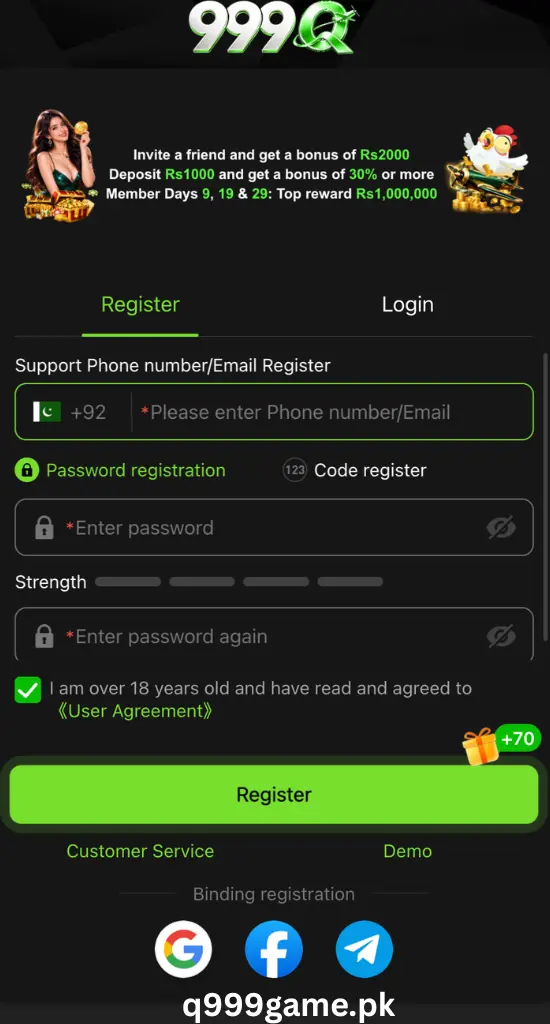
Check Available Rewards
The 999Q Game may display different promotional offers, registration rewards, daily activities, or special events. If a promotion is available, read its conditions carefully before accepting it. Some rewards can have specific eligibility requirements, expiry dates, or usage conditions. Understanding these terms can help users avoid confusion when using promotional features.
Add Funds
If a particular feature requires funds, users can select the available payment method from the account wallet. Enter the required amount and carefully check all transaction information before confirming. It is better to use only an amount that you can afford to lose and maintain a clear personal spending limit.
Explore Games
After setting up the account, users can browse the game lobby and explore the available categories. The selection may include card-based games, mini games, fishing-style games, and other entertainment options. Each game can have different rules and features, so users should read the instructions before starting.
Check the Account Balance
If the platform provides withdrawal functionality, users can review the available balance and the applicable withdrawal requirements from the wallet section. Withdrawal methods, minimum limits, processing times, and verification requirements can change, so always check the information displayed in the current version before submitting a request.
Key Gaming Features
Multiple Games to Play
One of the main features of the 999Q Game App is its collection of different game categories. Instead of using separate applications for different types of games, users can browse multiple sections from one platform. Depending on the current release, these may include card games, Teen Patti-style games, fishing games, slot-style games, and smaller casual games.
The variety can make the application more convenient for users who enjoy trying different gameplay formats. Each category can have its own interface, rules, and gameplay mechanics, so users should read the instructions before participating. Game availability may also change following application updates.
Rewards and Promotions
999Q may provide different promotional features for new and existing users. These can include registration promotions, daily activities, event-based rewards, referral programs, and other offers. Promotional conditions can vary between campaigns, so users should review the eligibility requirements and terms before claiming any reward.
Rewards should not be considered guaranteed income. Their value, availability, and conditions depend on the current promotion offered by the platform.

Gaming and Reward Features
The 999Q APK combines gaming features with account-based promotional activities. Users may find reward sections, event activities, referral features, and other account options within the application. These features can provide additional ways to interact with the platform, but results from games are not guaranteed.
Users should also avoid treating gaming as a reliable source of income. Setting a personal budget, understanding the rules, and stopping when the budget is reached are important practices when using platforms that involve paid gameplay.
Ad-Free Gameplay
The current version of 999Q may provide a gameplay environment with limited advertising or fewer interruptions. A cleaner interface can make it easier to move through different sections and focus on the game being played. However, application features can change after updates, so the actual advertising experience may vary between versions and devices.
Simple Interface
The 999Q Game is designed around a relatively simple navigation structure. Users can access different categories from the main interface and move between account-related sections without having to learn complicated controls. Menus, buttons, and game categories are arranged to help users locate the features they need.
New users should still take time to understand the application before using any paid features. Reading the game instructions and checking account settings can help prevent avoidable mistakes.
Security and Fair Play
999Q may use account security features such as passwords, verification procedures, and protected login systems. Users should create a strong and unique password and should never share their login information or verification codes with another person.
Game results and promotional conditions can vary according to the specific game or offer. Users should read the published rules rather than assuming that every game operates in the same way. No platform can guarantee winnings, so users should approach paid gameplay responsibly.
Customer Service
The 999Q platform may provide customer support for common account and technical issues. Users can contact support when they experience problems such as login difficulties, transaction delays, verification problems, or application errors. When contacting support, provide accurate information about the problem and avoid sharing sensitive passwords or OTP codes.
If an in-app support option is available, it can be used for general questions. Email support may be more suitable for detailed issues that require additional information or documentation.
Payment Methods
The payment options available on 999Q can depend on the current version, region, and account status. Users may see local options such as mobile wallets or bank transfers inside the wallet section. Before confirming a transaction, check the recipient information, amount, and transaction details carefully.
Never provide your account password or verification code to another person claiming to process a payment. If a transaction does not appear correctly, keep the transaction reference and contact the platform’s official support channel.
How to Download and Install the 999Q APK?
To install the 999Q APK on an Android device, follow these general steps:
01: Open a browser such as Chrome and locate a source that you can verify for the current 999Q APK.
02: Visit the relevant download page and check the application version and file information before downloading.
03: Tap the APK download button and wait for the file to finish downloading.
04: If Android blocks the installation, open the device security settings and allow installation from the relevant source. The exact setting can differ between Android versions.
05: Open the file manager and locate the downloaded 999Q APK file.
06: Tap the APK file and follow the installation instructions shown on the screen.
07: After installation is complete, open the application and check that it works correctly on your device.
08: Register or log in to your account and review the available features before using the application.
Android Operating System
- Android: Android 8.0 or higher is recommended.
- RAM: At least 2GB RAM is recommended for smoother operation.
- Storage: Keep sufficient free storage available for the APK and application data.
- Internet: A stable 3G, 4G, 5G, or Wi-Fi connection can provide a better experience.
- Security: Download APK files only from sources you can verify and scan unfamiliar files before installation.
How to Register and Log In to Your 999Q Account?
1. Registration Process
Follow these general steps to create a new account on the 999Q APK:
- Step 1: Open the installed 999Q application on your Android device.
- Step 2: Find the registration or sign-up button on the main screen.
- Step 3: Enter the required information, such as your phone number or other requested account details.
- Step 4: Create a strong password that is difficult for others to guess.
- Step 5: Enter a referral code if you have received a valid invitation and if the registration form requests one.
- Step 6: Review the information you entered and correct any mistakes.
- Step 7: Complete any required verification process.
- Step 8: Submit the registration form and wait for the account dashboard to load.
- Step 9: Once registration is complete, review the account settings and available features.
2. Login Process
If you already have a 999Q account, use the following general login process:
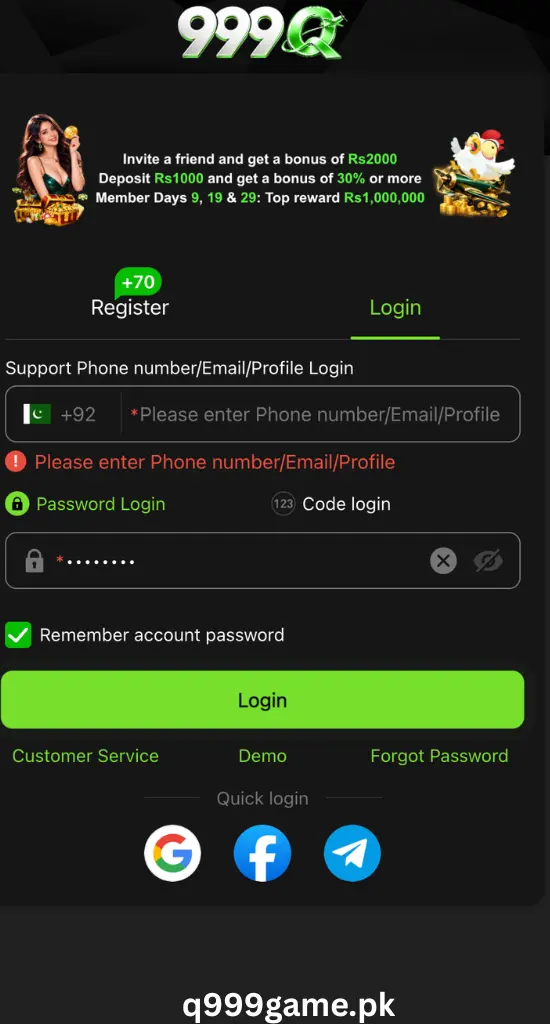
- Step 1: Open the 999Q app and select the login option.
- Step 2: Enter the phone number, username, email, or other login information associated with your account.
- Step 3: Enter your account password.
- Step 4: If required, complete the verification process.
- Step 5: If you have forgotten your password, select the password recovery option and follow the instructions.
- Step 6: Check your information and select the login button.
- Step 7: After successful authentication, you can access your account dashboard.
How to Add Funds to the 999Q Game Apk?
If a game or account feature requires a balance, you may be able to add funds through the wallet section. The exact process and payment methods can vary, so always follow the instructions displayed in your current account.
- Open the 999Q Game App and log in to your account.
- Open the wallet or account balance section.
- Select the available deposit or add-funds option.
- Choose one of the payment methods displayed by the platform.
- Enter the amount you want to add.
- Carefully review the payment details before confirming.
- Complete the transaction through the selected payment service.
- Check your 999Q wallet after the transaction has been processed.
- If the balance does not update, keep the transaction reference and contact official support.
How to Withdraw Funds from the 999Q Game Wallet?
If withdrawal functionality is available for your account, you can normally access it through the wallet section. Requirements and processing times can vary.
- Open the 999Q application and log in.
- Navigate to the wallet or balance section.
- Select the withdrawal option if it is available.
- Choose an available withdrawal method.
- Enter the requested amount and account information.
- Carefully review all details before submitting the request.
- Confirm the withdrawal according to the instructions shown.
- Keep the transaction reference for your records.
- If the request is delayed, contact the official customer support team.
Bonuses and Rewards Offered by Q999
The 999Q Game may provide different promotional features for new and existing users. These can include registration offers, first-deposit promotions, daily activities, referral rewards, event bonuses, and other promotional campaigns. The exact value and availability of these offers can change, so users should always check the current terms before claiming them.
Welcome Bonus and Registration Offer
New users may receive a registration-related promotion after creating an account. The conditions for receiving and using the offer can vary, and some promotions may require users to complete specific activities before they become available.
First Deposit Promotion
A first-deposit promotion may be displayed for eligible accounts. If such an offer is available, users should review its requirements, validity period, and any applicable restrictions before making a deposit.

Daily Rewards
Some versions or promotional campaigns may provide daily rewards for active users. These can include coins, points, or other in-app benefits. Availability depends on the current promotion and account eligibility.
Referral Bonus
The referral section may provide users with an invitation code or referral link. If the program is active, users can share their referral information with others and receive rewards according to the published referral terms.
Lucky Spin Rewards
A lucky-spin feature may be available as part of a promotional campaign. Users can access the feature when eligible and receive a randomly selected reward according to the rules shown inside the application.
Task Completion Rewards
The application may provide tasks or activities that users can complete to receive promotional rewards. These tasks can change regularly, so check the current task section for available requirements.
Level-Up Rewards
Some gaming platforms provide additional rewards based on account activity or user levels. If the 999Q version you are using includes this feature, the available benefits and requirements should be reviewed inside the application.
Event Bonuses
Special events may provide temporary promotions, additional rewards, or limited-time activities. These offers usually have their own terms and expiry dates, so users should check the details before participating.
How to Use the Referral System of 999Q?
The referral system can allow existing users to invite new users through a unique referral code or link. The exact reward depends on the current referral program and its conditions. Users should not assume that every registration will automatically generate a reward.
- Open the official 999Q application and log in.
- Find the referral, invite, or rewards section.
- Check whether a referral program is currently available.
- Copy your unique referral code or invitation link.
- Share the code or link with people who are interested in the platform.
- If an invited user registers through the required method, the referral may become eligible according to the published conditions.
- Check the referral section to track available rewards and completed invitations.
Responsible Gaming Tips for 999Q
Below are some practical tips for using the platform responsibly:
- 01: Understand the rules of a game before participating.
- 02: Set a personal spending limit before using any paid features.
- 03: Start with an amount you can comfortably afford to lose.
- 04: Do not increase spending simply to recover previous losses.
- 05: Take regular breaks instead of playing for extended periods.
- 06: Read promotional terms before accepting bonuses or offers.
- 07: Keep your account password and verification codes private.
- 08: Do not use borrowed money or essential household funds for gaming.
- 09: Stop using paid features if they begin affecting your normal responsibilities.
- 10: Remember that rewards and game outcomes are not guaranteed.
Customer Support of the 999Q Game
999Q may provide customer support to help users with account and technical issues. Common problems can include login errors, account verification, transaction delays, application crashes, and questions about available features. Before contacting support, collect relevant information such as your username, transaction reference, and a description of the problem.
In-App Support
If the application includes a support or live-chat feature, users can use it to contact the support team directly. This can be useful for general account questions and problems that require a quick response.
Email Support
Email support can be useful when the issue requires a detailed explanation. When contacting support, explain the problem clearly and include relevant account information. Never include your password, OTP, or other confidential authentication details in an email.

Common Problems and Their Solutions
APK Not Installing
Some Android users may experience installation problems after downloading an APK file.
Solutions
- Check whether your device has enough free storage.
- Make sure the APK is compatible with your Android version.
- Review the installation permissions in Android settings.
- Download the current APK from a source you can verify.
- Remove an incomplete or corrupted APK file and download it again.
App Crashes
The application can sometimes freeze or close unexpectedly because of limited device resources, outdated software, or compatibility problems.
Solutions
- Restart your Android device and open the app again.
- Close unnecessary applications running in the background.
- Clear the application’s temporary cache.
- Make sure your Android system has available storage.
- Install the latest compatible version if an update is available.
OTP Not Received
Some users may not receive a verification code during registration or account recovery.
Solutions
- Check that the registered phone number is correct.
- Wait a few minutes before requesting another code.
- Check your mobile network connection.
- Avoid requesting multiple OTPs repeatedly within a short period.
- Contact official support if the verification problem continues.
Login Issues
Login problems can occur when incorrect account information is entered or when an account requires additional verification.
Solutions
- Check your registered phone number or username.
- Confirm that the password has been entered correctly.
- Use the password recovery option if you cannot remember your password.
- Check your internet connection.
- Contact official support if you still cannot access the account.
Deposit Delay
A balance update may sometimes take longer than expected after a transaction.
Solutions
- Wait a few minutes and refresh the wallet.
- Check whether the payment was successfully completed.
- Keep the transaction reference or receipt.
- Contact official support if the balance remains unchanged.
- Never send additional funds to an unknown person claiming to be a support representative.
Is 999Q Safe to Use?
The safety of a third-party application depends on the source of the APK, the application’s security practices, the payment methods used, and how users protect their accounts. Before installing the 999Q APK, verify that you are using a legitimate source and check the application permissions carefully.
Users should also remember that an APK being available online does not automatically prove that it is safe. Avoid modified APK files, unknown download pages, and unofficial links. Use a strong password, keep verification codes private, and review the platform’s current terms and privacy information before creating an account.
If the platform involves paid gameplay or withdrawals, users should also consider the applicable laws and regulations in their location before using those features.
Pros and Cons of Using the 999Q App
Pros
- The platform brings different game categories together in one application.
- The interface is designed to be straightforward for new users.
- The Android APK can provide direct access to the application.
- Promotional features may include events, daily activities, and referral programs.
- Account management and game categories can be accessed from a single platform.
- Local payment methods may be available depending on the current version and region.
Cons
- Game outcomes and rewards are not guaranteed.
- Payment and withdrawal processing times can vary.
- The application may be distributed outside the Google Play Store.
- Third-party APK files can create security risks when downloaded from unreliable sources.
- Some features may not be available in every region or account.
- Paid gameplay can result in financial loss if users do not maintain a spending limit.
Conclusion
999Q is a mobile gaming platform that brings multiple game categories and account features together in one application. The 999Q Game App is designed with a simple interface, making it possible for users to browse different sections, create an account, and explore available games from their Android devices. Depending on the current version, users may also find promotional activities, referral features, events, and other account-based rewards.
The 999Q APK can be useful for users who prefer accessing a gaming platform directly through Android. However, users should download APK files carefully, review permissions, and avoid unofficial or modified versions. Payment features should also be used carefully, with transaction information checked before confirmation.
Overall, 999Q provides a variety of gaming and promotional features within one platform. Users should understand the rules, check the current terms, protect their account information, and use paid features responsibly. Game results and rewards are never guaranteed, so the platform should be treated as entertainment rather than a dependable source of income.
FAQs
Is 999Q Game free to download?
Yes. The latest 999Q Game APK can be downloaded and installed free from a trusted source.
Is 999Q available on Google Play Store?
No. 999Q Game is generally provided as an APK and needs to be installed manually on Android devices.
Which Android version is required?
The required Android version depends on the latest APK release. Check the current requirements before installing 999Q APK.
How do I update 999Q APK?
Download the latest 999Q APK from a trusted source and install it over the existing version.
Is 999Q Game safe to use?
Download 999Q Game only from a trusted source, use a strong password, and avoid modified APK files.
Can I install 999Q on older Android phones?
Yes, if your device meets the minimum Android and hardware requirements of the current 999Q APK.
Does 999Q Download receive regular updates?
Yes. Updates may improve performance, stability, compatibility, and other features of the 999Q Game App.
Can I recover my password?
Yes. Use the Forgot Password option on the login page and follow the recovery instructions.
Does 999Q Game support Pakistani users?
Yes. 999Q login is designed for Pakistani users and may provide local payment options depending on the current version.
Should I download the APK from any website?
No. Always download the 999Q APK from a trusted and verified source to avoid modified or unsafe files.